
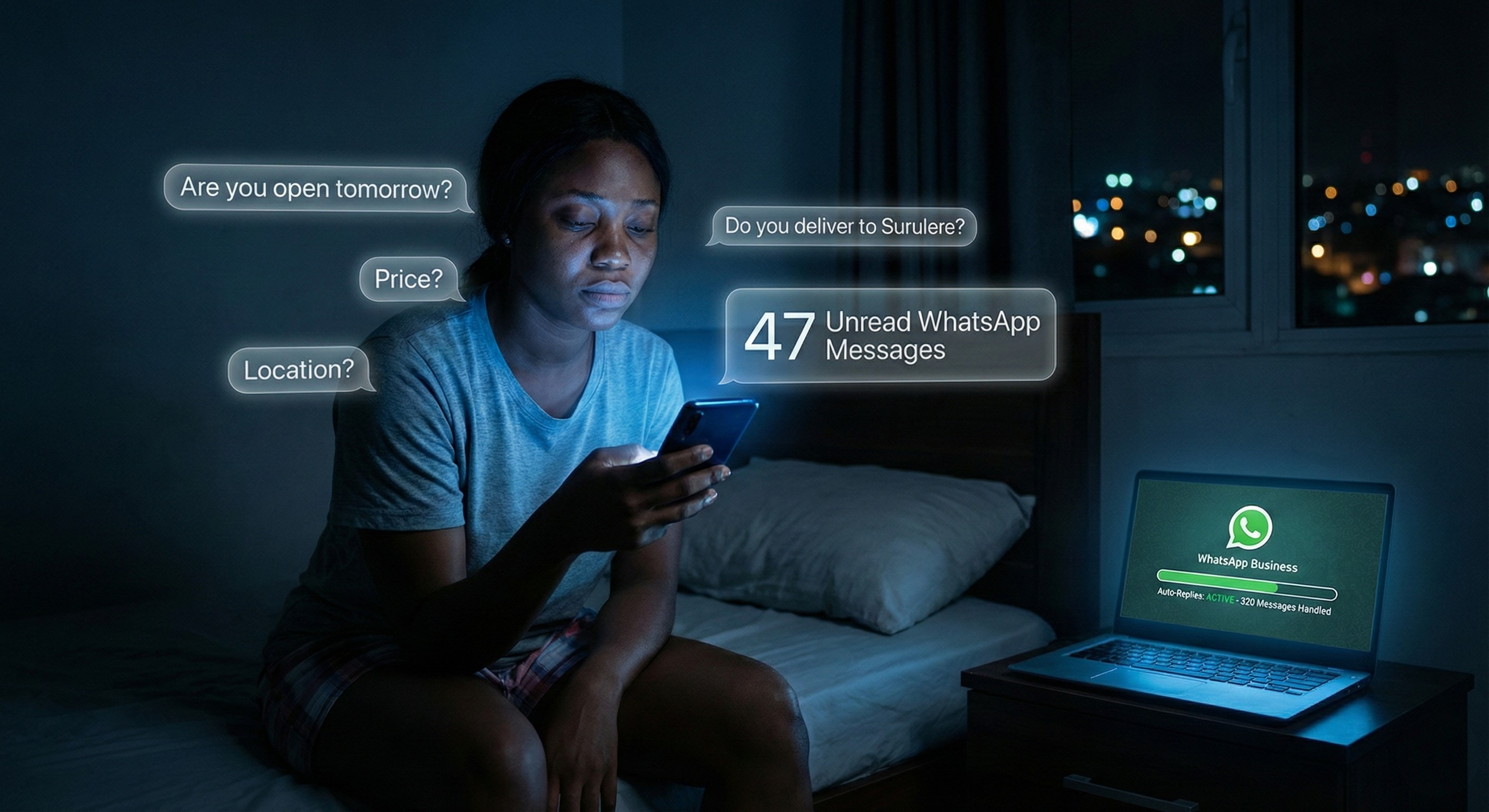
It’s 2am in Ikeja. You’re awake, phone in hand, responding to a customer message that came in at 11pm: “Are you open tomorrow?”
This is the third time someone asked that question today. Your phone shows 47 unread WhatsApp messages. Most are asking the same five questions you’ve answered a hundred times. You’re exhausted.
But here’s the thing: you’re not tired because you’re not working hard enough. You’re tired because you’re doing everything manually. Every single message. Every single time.
What if 80% of these messages could answer themselves?
Welcome to Week 1 of the 5-Week Automation Challenge. Over the next five weeks, I’m going to show you how to automate the five most time-consuming tasks in your Nigerian business. Each automation takes 10-30 minutes to set up, costs N0-N2,000 per month, and saves you hours every single week.
This week, we’re tackling the automation that will give you your evenings back: WhatsApp Business Auto-Replies.
About This 5-Week Series
Before we dive in, here’s what’s coming:
- Week 1 (This Week): WhatsApp Business Auto-Replies – Stop the repetitive messages
- Week 2: Automated Payment Reminders – Get paid faster without awkward chasing
- Week 3: Appointment Booking System – End the scheduling back-and-forth
- Week 4: Daily Sales Summary – Know your numbers automatically
- Week 5: Customer Follow-Up Sequences – Turn one-time buyers into repeat customers
Each week builds on the last, but every automation works standalone. If you join us mid-series, you can still implement that week’s automation and catch up on previous weeks.
The Challenge: Implement one automation per week. By Week 5, you’ll have reclaimed 10-15 hours per week and transformed how your business operates.
Ready? Let’s start.
The Problem: Your Phone Never Stops
Let me guess your daily reality:
6:30am: Customer message – “Good morning, what time do you open?”
9:15am: During a meeting – “Where is your shop located?”
1:45pm: During lunch – “What are your prices?”
6:30pm: During family dinner – “Do you deliver to Surulere?”
10:45pm: Just before bed – “Are you open tomorrow? I need to come first thing.”
11:30pm: In bed – “Hello? Are you there?”
The questions repeat. Twenty, thirty, sometimes fifty times a day. The same five questions. Different customers, same questions.
You’re constantly checking your phone. Quick responses mean more sales, but constant availability means no personal life. You can’t win.
Here’s what you need to understand: 80% of the messages your business receives are asking the same questions. You don’t need to personally answer repetitive questions. You just need to make sure they get answered – instantly, professionally, even at midnight.
That’s exactly what WhatsApp Business auto-replies do.
The Solution: WhatsApp Business Auto-Replies
WhatsApp Business is a free app (separate from regular WhatsApp) built specifically for businesses like yours. It lets you:
- Send automatic responses to common questions
- Set away messages for after business hours
- Greet new customers automatically
- Create quick replies for information you send frequently
What you’ll achieve this week:
- Instant responses to common questions, even when you’re asleep
- Professional away messages that set expectations
- Automatic greetings that make great first impressions
- Quick access to frequently sent information (one tap instead of retyping)
What you need:
- WhatsApp Business app (completely free)
- Your current phone (no new equipment needed)
- 20 minutes today
Time you’ll save: 5-8 hours per week (that’s one full work day)
Let’s set it up.
Step-by-Step Setup Guide
Step 1: Download WhatsApp Business
- Go to your app store (Google Play or Apple App Store)
- Search for “WhatsApp Business” – look for the green icon with a “B”
- Download and install (it’s completely free)
- Open the app and verify your business phone number
Important: WhatsApp Business is separate from regular WhatsApp. You can have both on the same phone. When you set it up, you can migrate your business contacts while keeping personal WhatsApp for family and friends.
If you’re already using regular WhatsApp for business, you can migrate everything over. The app will guide you through the process.
Step 2: Set Up Your Business Profile
Before we automate, make your profile professional:
- Tap the three dots (top right) → Settings → Business Settings → Profile
- Add:
- Your business name
- Business category (e.g., Retail, Beauty, Food Service)
- Business description (one clear sentence about what you do)
- Business address (helps with local discovery)
- Business hours (customers see when you’re typically available)
- Website/Instagram/Facebook links (if you have them)
This takes 5 minutes but makes you look immediately more professional than 90% of Nigerian businesses on WhatsApp.
Step 3: Set Up Your Away Message
This is the message people receive when you’re not available. Here’s how:
- Settings → Business Tools → Away Message
- Toggle it ON
- Set your schedule – when should this auto-reply send?
For most Lagos businesses, try:
- Weekdays: 8pm to 8am
- Weekends: 6pm Friday to 8am Monday (or customize based on your hours)
- Write your away message
Example away message:
“Thank you for contacting [Your Business Name]! Our team responds between 8am-8pm WAT, Monday to Saturday.
Send your question now and we’ll reply first thing when we’re back online. For urgent orders, please call 080XXXXXXXX.
We appreciate your patience! 🙏”
Key elements:
- Thank them (politeness goes far)
- Tell them when you WILL respond (sets expectations)
- Give alternative for genuine emergencies (phone call)
- Keep it under 4 lines (nobody reads essays)
Step 4: Set Up Your Greeting Message
This automatically goes to every new customer who contacts you for the first time. It’s your digital handshake.
- Settings → Business Tools → Greeting Message
- Toggle it ON
- Write your greeting
Example greeting message:
“Hi! 👋 Welcome to [Your Business Name]. We specialize in [brief service description]. How can we help you today?
📍 Location: [Your area, Lagos]
💳 Payment: Bank Transfer/Cash/POS
🚚 Delivery: Available in Lagos
⏰ Hours: 8am-8pm, Mon-Sat”
Strategic elements:
- Friendly opening (builds rapport)
- Clear value proposition (what you do)
- Preemptively answers common questions (location, payment, delivery, hours)
- Uses emojis (makes it scannable, modern)
Notice how this greeting answers questions before customers ask? That’s intentional. Fewer follow-up questions means faster conversions.
Step 5: Create Quick Replies
Quick replies are saved messages you access instantly by typing a forward slash. These are game-changers for information you send multiple times per day.
- Settings → Business Tools → Quick Replies
- Tap the + button
- Create shortcuts
Essential quick replies to create:
/prices
Message: “Here are our current prices:
[Your actual price list or link to catalog]
All prices include [what’s included]. Payment via bank transfer, cash, or POS. Let me know if you have questions! 😊”
Shortcut: /prices
/location
Message: “[Your Business Name]
Address: [Full address with landmarks]
Google Maps: [Insert Google Maps link]
We’re open 8am-8pm, Mon-Sat. See you soon! 📍”
Shortcut: /location
/payment
Message: “Payment Details:
Bank Name: [Your Bank]
Account Number: [Your Account]
Account Name: [Your Business Name]
After payment, please send your receipt and delivery details. Thank you! 💳”
Shortcut: /payment
/delivery
Message: “We deliver to:
Delivery within 24 hours of confirmed payment. Same-day delivery available for [extra fee]. 🚚”
Shortcut: /delivery
/hours
Message: “We’re open: Monday – Saturday: 8am – 8pm Sunday: Closed
Public holidays: [Your policy]
What day works best for you? 📅”
Shortcut: /hours
/catalog
Message: “View our full catalog here: [Instagram link / Website / Google Drive link to PDF]
See something you like? Send me the item name or screenshot and I’ll give you full details! 😊”
Shortcut: /catalog
How to use quick replies:
When someone asks “What are your prices?”, you simply type /prices and the full response appears instantly. Tap send. Done in 2 seconds instead of retyping everything.
Step 6: Test Everything
Before going live with customers, test your setup:
- Send messages to your business number from a friend’s phone or your personal WhatsApp
- Send one during business hours (greeting message should appear)
- Send one during away hours (away message should appear)
- Try your quick replies to make sure they work
Adjust anything that doesn’t feel right. This is your chance to refine before customers see it.
The Nigerian Context: Why This Works Here
WhatsApp is Where Nigerian Business Happens
Most Nigerian customers prefer WhatsApp over email, phone calls, or any other platform. They’re already on it multiple times per day. They trust it. They expect businesses to use it.
Fighting this reality is pointless and expensive. Instead, make WhatsApp work smarter for you.
Auto-Replies Work Even With Poor Connection
Your auto-replies work even when your network is unstable. If your internet drops while someone messages you, the auto-reply will send as soon as connection returns. Your customer gets their answer; you don’t lose the sale.
This is huge in Lagos where network can be unpredictable.
Nigerian Customers Don’t Expect 24/7 Availability
Here’s something important: Nigerian customers don’t expect you to be available at midnight. They do expect clear communication.
A professional auto-reply that says “I’ll respond at 8am tomorrow” is FAR better than:
- Silence for 12 hours
- A rushed, unclear response at 2am
- “Sorry, I was sleeping” the next day
Auto-replies set expectations. That’s professional.
It Levels the Playing Field
Small businesses can now respond as quickly as big companies. Your customer messaging you at 11pm gets instant information – just like they would from Jumia or Konga.
That instant response builds trust and increases conversion, even though you’re actually asleep.
What Changes Immediately
Once you activate these automations, here’s what happens:
You Can Put Your Phone Down
During family dinner, your phone can stay in your pocket. Customer questions are being answered. You’re not losing sales. You’re just setting boundaries.
60-70% of Messages Get Answered Automatically
The repetitive questions – “Are you open?” “Where are you?” “What are your prices?” – all get instant answers. You only respond to the unique, genuine inquiries that need your personal attention.
Customers Get Instant Information
No more “I’ll check my prices and get back to you.” They get comprehensive information immediately. Faster information = faster decisions = more sales.
You Look Organized and Professional
A well-crafted auto-reply says “I’m running a serious business with systems” far more than a quick manual reply says.
Professional communication increases perceived value. You can charge premium prices when you operate professionally.
New Customers Understand You Immediately
Your greeting message tells them exactly what you do, where you are, how to pay, and when you’re available. All in their first interaction. No confusion. No endless back-and-forth. Clear communication from the start.
Setup time: 20 minutes
Time saved per week: 5-8 hours
Cost: N0 (completely free)
Difficulty: Very easy
Pro Tips for Success
Update During Holidays
Change your away message for Salah, Christmas, Easter, and New Year. Customers appreciate knowing you’re observing holidays.
Example: “Happy Salah! We’re closed for celebrations Dec 25-27. We’ll respond to all messages on Dec 28. Enjoy the holiday! 🎉”
Include Your Catalog Link in Greeting
If you have an Instagram shop, online catalog, or website, include the link in your greeting message. Let customers browse while waiting for you to respond to specific questions.
Test From Another Number Monthly
Once a month, send yourself a message from a friend’s phone to make sure everything still works properly. Technology updates sometimes break things.
Review and Update Quick Replies
Every month, look at the questions customers still ask after seeing your auto-replies. Create new quick replies for those common questions. Your system should evolve.
Keep Messages Concise
Auto-replies should be short – three to four lines maximum for away messages, slightly longer for greetings with details. If someone needs more information, they’ll ask, and that’s when you respond personally.
Use Natural Language
Don’t sound robotic. Write how you’d actually speak to a customer. Add appropriate emojis if that’s your style (but don’t overdo it – one or two per message maximum).
Add Personality
Your auto-replies should still sound like YOU. If you’re formal, be formal. If you’re friendly and casual, be that. Automation doesn’t mean removing your personality.
Common Mistakes to Avoid
Making Auto-Replies Too Long
Nobody reads paragraphs. Keep it scannable. Use line breaks. Maximum 4-5 lines for away messages.
Not Including Alternative Contact
For genuine emergencies, give customers an option – your phone number for urgent situations. Most won’t call, but having the option builds trust.
Setting Greeting Message Too Generic
“Hello, welcome to my business” tells customers nothing. Be specific: “Welcome to [Name]! We specialize in [specific thing]. Location: [Area]. Hours: [Times].”
Forgetting to Test
If you don’t test your setup, you won’t know it’s broken until a customer tells you (or worse, leaves without telling you). Test before going live.
Not Updating Away Hours
If your hours change temporarily (you’re traveling, there’s a holiday), update your away message schedule. Telling customers you’ll respond at 8am when you won’t is worse than no auto-reply.
Real Results: What Nigerian Business Owners Are Saying
“I set this up on a Sunday night. By Monday morning, I had 8 messages that were all answered automatically while I slept. I only needed to respond to 3 genuine inquiries. This is magic.” – Chioma, Fashion Designer, Lekki
“My customers actually thank me for the auto-replies. One said ‘I love that you tell me when you’ll respond instead of leaving me guessing.’ Professional communication builds trust.” – Emeka, Phone Accessories Retailer, Ikeja
“I was skeptical about automation feeling cold. But my greeting message is warmer and more informative than my rushed manual responses used to be. And I get my evenings back.” – Ngozi, Catering Business, Victoria Island
This Week’s Challenge
Here’s your homework before next Monday:
1. Set Up the Basics
- Download WhatsApp Business
- Set up business profile
- Create away message
2. Create Quick Replies
- Set up at least 3 quick replies (/prices, /location, /hours)
- Test them with a friend
3. Refine Your Greeting
- Write and activate your greeting message
- Send yourself a test from another number
4. Go Live
- Start using auto-replies with real customers
- Notice what questions still come up frequently
5. Add More Quick Replies
- Based on the week’s common questions, create 2 more quick replies
6. Review and Celebrate
- Check your stats: How many messages were handled automatically?
- Enjoy your first weekend with less phone stress
Share your wins! Comment below with your results. How many hours did you reclaim this week? What surprised you about the setup?
Next Week: Automation #2
Next Monday, we’re tackling the automation that will get you paid faster: Automated Payment Reminders.
You’ll learn how to:
- Stop the awkward “just following up on payment” conversations
- Get paid in 10 days instead of 30+ days
- Track outstanding invoices automatically
- Send professional reminders that actually work
No more chasing payments manually. No more feeling uncomfortable about asking for your money.
Can’t wait? That’s good – it means you’re ready to transform your business. But implement this week’s automation first. One week at a time. Build the habit.
See you next Monday for Week 2!
Join the Community
Hundreds of Nigerian business owners are taking this 5-Week Automation Challenge with you. You’re not alone.
Share your progress:
- Comment below with your wins and challenges
- Tag us on Instagram/Twitter: @techuncode
- Share this article with a business owner who needs it
Questions? Drop them in the comments. We read and respond to every single one.
Your business is about to work smarter. Let’s go.
Opeyemi Ajilore is a Content Strategist and tech journalist covering African technology and productivity.



















 and then